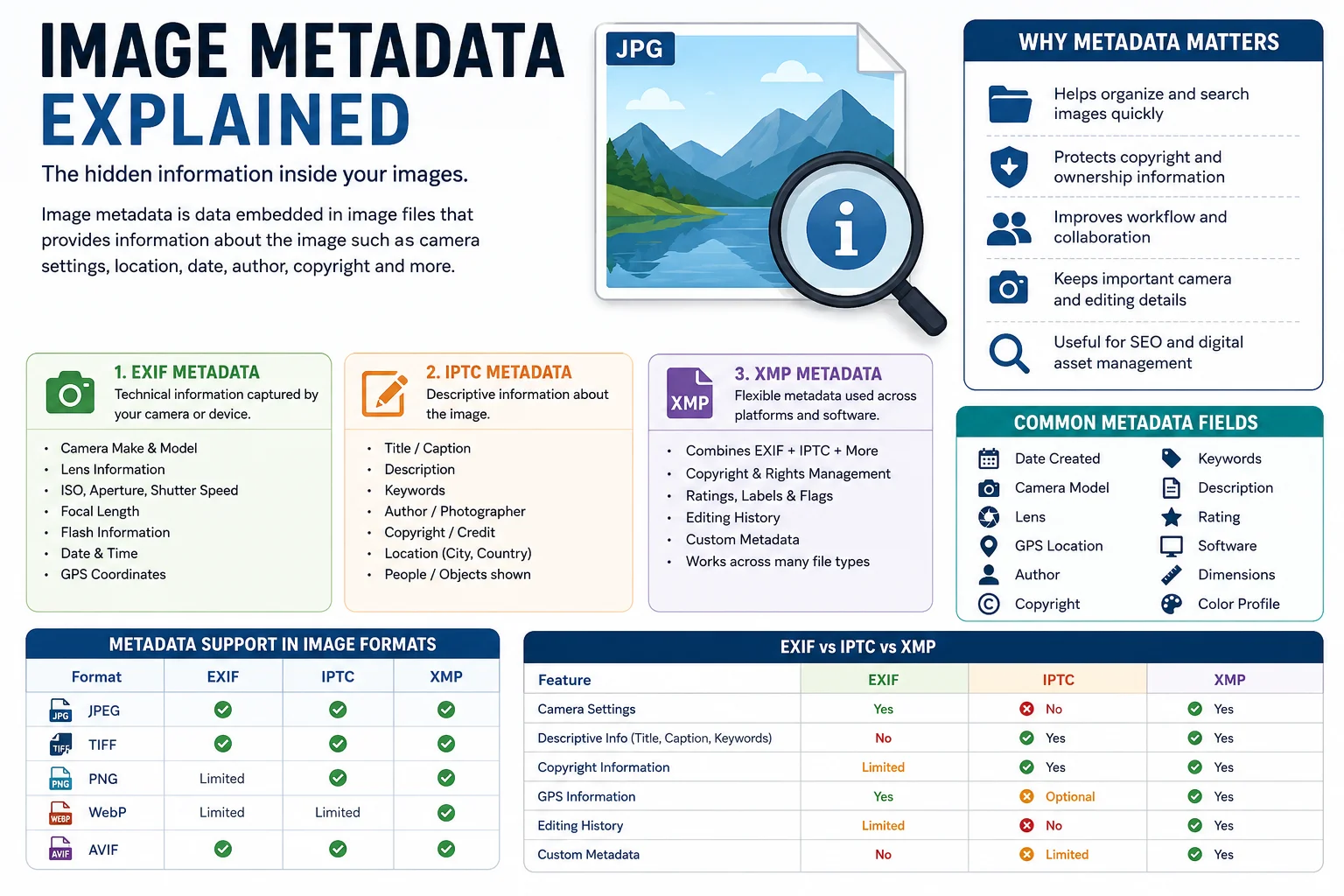
Whenever you take a photo with your smartphone or digital camera, the image contains much more than just pixels. Hidden inside the file is additional information called image metadata. This information can tell you when the image was captured, which camera was used, where it was taken, who owns it, and even what software edited it.
Image metadata is valuable for photographers, designers, businesses, journalists, and anyone who works with digital images. It helps organize photos, protect copyright, simplify workflows, and preserve important technical information.
In this guide, you'll learn everything you need to know about image metadata, including the three major metadata standards EXIF, IPTC, and XMP their differences, benefits, privacy considerations, and how metadata is affected when converting images.
What Is Image Metadata?
Image metadata is information stored inside an image file that describes the image. Unlike the visible pixels, metadata contains details about the image's creation, technical settings, ownership, and other descriptive information.
According to Adobe, metadata is standardized information about a file, including author, copyright, resolution, color space, and keywords.
Common examples include:
- Camera model
- Lens information
- Date and time
- GPS location
- Author name
- Copyright
- Keywords
- Image description
- Editing software
- Color profile
Why Is Image Metadata Important?
Metadata makes image management much easier.
Its benefits include:
- Easier photo organization
- Faster searching and filtering
- Copyright protection
- Better collaboration
- Professional asset management
- Recording camera settings
- Improved publishing workflows
- Preserving ownership information
Adobe notes that metadata helps streamline workflows and organize digital assets across applications.
Types of Image Metadata
Image metadata is generally divided into three major standards.
| Metadata Type | Main Purpose | Common Use |
|---|---|---|
| EXIF | Camera information | Photography |
| IPTC | Descriptive information | News, media, stock photography |
| XMP | Flexible metadata framework | Creative workflows |
1. EXIF Metadata
EXIF stands for Exchangeable Image File Format.
Most digital cameras and smartphones automatically create EXIF metadata whenever you capture a photo.
Typical EXIF fields include:
| EXIF Information | Example |
|---|---|
| Camera Make | Canon |
| Camera Model | EOS R8 |
| Lens | RF 24-105mm |
| ISO | 400 |
| Aperture | f/2.8 |
| Shutter Speed | 1/500 sec |
| Focal Length | 50 mm |
| Flash | On/Off |
| GPS Coordinates | Available if enabled |
| Date Taken | 2026-07-21 |
EXIF is mainly technical metadata and is generated automatically by the camera.
2. IPTC Metadata
IPTC stands for International Press Telecommunications Council.
It focuses on descriptive information instead of camera settings.
Common IPTC fields include:
- Title
- Caption
- Description
- Keywords
- Photographer
- Copyright
- Rights
- Credit
- City
- Country
- People shown
IPTC metadata is widely used by:
- News agencies
- Photojournalists
- Stock photography websites
- Media companies
The IPTC Photo Metadata Standard defines these fields for consistent photo description and rights management.
3. XMP Metadata
XMP stands for Extensible Metadata Platform.
It was developed by Adobe and later standardized as ISO 16684. XMP provides a flexible way to embed metadata directly into files or store it in sidecar files when needed.
XMP can store:
- EXIF data
- IPTC data
- Copyright
- Ratings
- Labels
- Workflow information
- Custom metadata
- Editing history
Unlike EXIF, XMP is highly extensible and is designed for modern creative workflows.
EXIF vs IPTC vs XMP
| Feature | EXIF | IPTC | XMP |
|---|---|---|---|
| Camera Settings | ✅ | ❌ | ✅ |
| Copyright | Limited | ✅ | ✅ |
| Keywords | ❌ | ✅ | ✅ |
| GPS Data | ✅ | Optional | ✅ |
| Editing History | Limited | ❌ | ✅ |
| Custom Fields | ❌ | Limited | ✅ |
| Best For | Photography | Publishing | Creative workflows |
Common Metadata Fields
Here are some of the most frequently used metadata fields.
| Field | Purpose |
|---|---|
| File Name | Image identifier |
| Title | Image title |
| Author | Creator |
| Copyright | Ownership |
| Description | Image details |
| Keywords | Searchability |
| Camera Model | Device used |
| Lens | Lens information |
| ISO | Camera sensitivity |
| Exposure | Technical settings |
| GPS Location | Capture location |
| Date Created | Capture date |
| Software | Editing application |
Which Image Formats Support Metadata?
Different image formats support metadata to varying degrees.
| Format | EXIF | IPTC | XMP |
|---|---|---|---|
| JPEG | ✅ | ✅ | ✅ |
| TIFF | ✅ | ✅ | ✅ |
| PNG | Limited | Supported by some tools | ✅ |
| WebP | Supported by modern implementations | Limited | Supported |
| AVIF | Supported | Supported | Supported |
Support depends on both the file format specification and the software used to read or write the metadata.
Does Image Conversion Remove Metadata?
Sometimes.
Whether metadata is preserved depends on the converter.
Some image converters:
- Keep EXIF information
- Remove GPS data
- Strip metadata to reduce file size
- Preserve copyright
- Copy XMP metadata
If you want to keep important information, always check whether your image conversion tool offers an option to preserve metadata.
If your workflow requires privacy, removing metadata before sharing can be beneficial.
Metadata and Privacy
Metadata may reveal more information than you expect.
For example:
- Your home location
- Camera model
- Phone model
- Date and time
- Editing software
- Author information
If you are sharing personal photos publicly, consider removing GPS metadata to protect your privacy.
Metadata and SEO
Image metadata is useful for organization and rights management. IPTC also provides guidance for metadata fields that can help search services identify creator and licensing information when supported. However, metadata alone is not a ranking factor for Google Search. For the best SEO, combine metadata with descriptive filenames, alt text, captions, and relevant page content.
Best Practices for Managing Image Metadata
Follow these recommendations:
- Add your copyright information.
- Include the author's name.
- Use descriptive titles and captions.
- Add relevant keywords.
- Keep dates accurate.
- Remove GPS information before public sharing if privacy is a concern.
- Preserve metadata when converting professional images.
- Review metadata after exporting edited files.
How Loanvo Can Help
If you're converting images with Loanvo, it's a good practice to check whether the selected conversion tool preserves the metadata you need. For photographers and businesses, retaining copyright or descriptive metadata may be important, while users focused on privacy or file size may prefer to remove unnecessary metadata before sharing.
Frequently Asked Questions
What is image metadata?
Image metadata is hidden information stored inside an image file that describes the image, including camera settings, copyright, dates, keywords, and location.
What is the difference between EXIF and IPTC?
EXIF stores technical camera information, while IPTC stores descriptive information such as captions, keywords, author details, and copyright.
What is XMP?
XMP is Adobe's metadata framework that can store EXIF, IPTC, copyright information, ratings, labels, and custom metadata in a flexible, standardized format.
Does converting an image remove metadata?
It depends on the converter. Some tools preserve metadata, while others remove it to reduce file size or improve privacy.
Should I remove metadata before sharing photos?
If the image contains GPS coordinates or sensitive information, removing metadata can help protect your privacy.
Conclusion
Image metadata is an essential part of modern digital photography and image management. It stores technical details, descriptive information, and ownership data that make images easier to organize, search, and protect.
Understanding the differences between EXIF, IPTC, and XMP helps you choose the right workflow for photography, publishing, or web use. Whether you're compressing images, converting formats, or sharing photos online, knowing how metadata works ensures you keep the information you need—and remove what you don't.