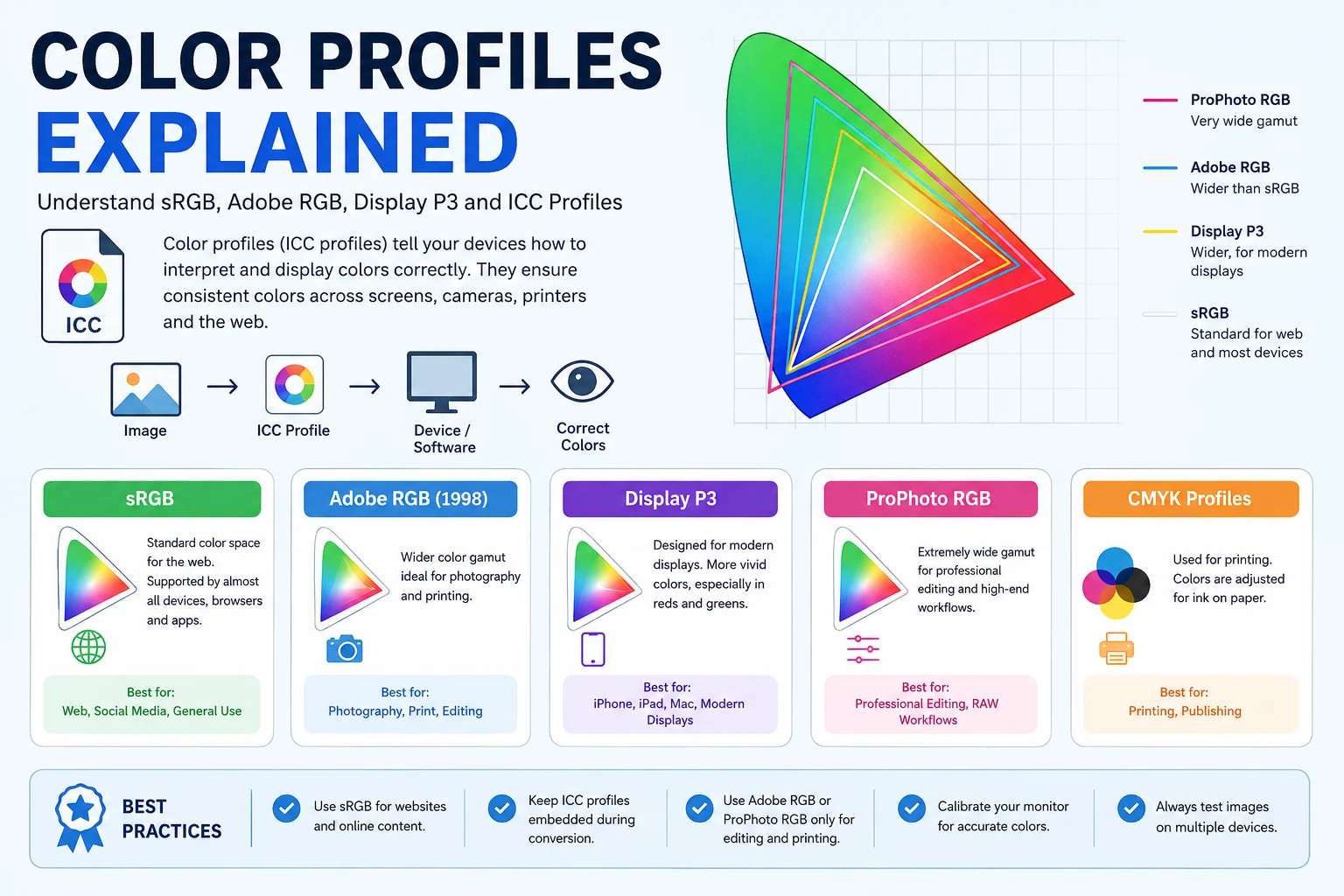
If you've ever converted an image and noticed that the colors suddenly looked dull, oversaturated, or different on another device, the problem often isn't the image format it's the color profile.
A color profile tells software and devices how to interpret the color values stored in an image. Without the correct profile, the same image can look different on different monitors, phones, browsers, or printers. Modern image formats such as JPEG, PNG, TIFF, WebP, AVIF, and HEIC can all carry color profile information.
What Is a Color Profile?
A color profile, usually an ICC profile (International Color Consortium profile), is a standardized file that describes how colors should be displayed or printed.
Think of it as a translator:
- Image stores RGB values (such as 255, 0, 0)
- Color profile explains what those values actually mean
- Software converts them correctly for your display or printer
Without this translation, identical RGB numbers may produce different colors on different devices.
Why Color Profiles Matter
Color profiles help maintain consistent colors across:
| Device | Benefit |
|---|---|
| Camera | Captures intended colors |
| Monitor | Displays accurate colors |
| Smartphone | Keeps colors consistent |
| Printer | Produces predictable prints |
| Web Browser | Displays images correctly on different displays |
Without color management:
- Reds may appear orange
- Blues may become purple
- Skin tones may shift
- Saturation may increase or decrease
- Printed colors may not match the screen
How Color Profiles Work
The process is simple:
Image
     ↓
Embedded ICC Profile
     ↓
Operating System / Browser
     ↓
Monitor ICC Profile
     ↓
Correct Colors Displayed
When both the image profile and display profile are available, color-managed software converts colors accurately.
Most Common Color Profiles
| Color Profile | Best For | Color Range |
|---|---|---|
| sRGB | Websites, social media | Standard |
| Adobe RGB | Professional photography | Wider |
| Display P3 | Modern phones & Apple devices | Wide |
| ProPhoto RGB | Professional editing | Extremely wide |
| CMYK Profiles | Printing | Print-specific |
sRGB
sRGB is the world's most widely supported color space.
It is supported by:
- Chrome
- Firefox
- Edge
- Safari
- Android
- Windows
- macOS
- Most monitors
- Social media platforms
Because nearly every device understands sRGB, it is the safest choice for web images. W3C recommends treating untagged web images as sRGB, and PNG explicitly supports sRGB tagging.
Best for
- Websites
- Blogs
- Loanvo image tools
- JPEG
- PNG
- WebP
- AVIF
- Social media
Adobe RGB
Adobe RGB offers a wider color gamut than sRGB, especially in green and cyan regions.
Advantages:
- Better for professional photography
- Better for printing
- More editable color information
Disadvantages:
- Not every browser or application displays it correctly
- Images may appear dull if interpreted as sRGB
Adobe recommends attaching the ICC profile so applications know how to display colors correctly.
Display P3
Display P3 is becoming increasingly common because modern smartphones and high-end monitors support wider color gamuts.
It is widely used by:
- iPhones
- iPads
- MacBooks
- Apple displays
- Some Android flagship phones
Display P3 provides more vivid reds, greens, and oranges while using an sRGB-like transfer function, making it suitable for modern displays.
ProPhoto RGB
ProPhoto RGB is one of the largest commonly used RGB color spaces.
It is intended for:
- RAW photo editing
- Professional photographers
- Lightroom workflows
- Photoshop editing
It is not recommended for web publishing, because many applications cannot display it correctly without proper color management.
ICC Profiles Explained
ICC stands for International Color Consortium.
An ICC profile describes:
- Color gamut
- White point
- Tone response (gamma)
- Color conversion information
Applications use these profiles to convert colors between devices accurately.
Embedded vs Missing Color Profiles
| Embedded ICC Profile | Missing ICC Profile |
|---|---|
| Colors display correctly | Colors may shift |
| Better cross-device consistency | Different apps may guess the color space |
| Recommended | Not recommended |
Many image converters accidentally strip ICC metadata during optimization, which can change image appearance.
Which Image Formats Support Color Profiles?
| Format | ICC Support |
|---|---|
| JPEG | Yes |
| PNG | Yes |
| TIFF | Yes |
| WebP | Yes |
| AVIF | Yes |
| HEIC | Yes |
| PSD | Yes |
PNG supports ICC profiles through the iCCP chunk and can also indicate sRGB directly using the sRGB chunk.
Why Images Look Different After Conversion
Common reasons include:
- ICC profile removed
- Wrong color space selected
- Browser assumptions
- Software ignoring color management
- Wide-gamut monitor displaying untagged images
These issues often appear when converting images without preserving metadata or when using software that strips ICC profiles.
Best Color Profile for Websites
For almost every website—including image conversion services like Loanvo—the recommended choice is:
✅ sRGB
Reasons:
- Universal browser support
- Small compatibility issues
- Predictable colors
- Social media compatibility
- Works on almost every monitor
Best Color Profile for Printing
Professional printing often uses:
- Adobe RGB
- Printer-specific ICC profiles
- CMYK profiles supplied by the print lab
Many print providers publish ICC profiles so designers can soft-proof images before printing.
Should You Preserve ICC Profiles During Image Conversion?
Yes.
When converting images:
✔ Preserve ICC profile whenever possible.
Reasons:
- Consistent colors
- Better display on different devices
- Accurate printing
- Professional workflow
If your converter offers a "Preserve Metadata" or "Keep Color Profile" option, enable it unless you intentionally want to remove metadata to reduce file size.
Best Practices
- Use sRGB for websites and social media.
- Keep embedded ICC profiles during conversion when color accuracy matters.
- Use Adobe RGB only for editing or print workflows.
- Use Display P3 if your workflow specifically targets wide-gamut Apple or compatible devices.
- Calibrate your monitor for accurate editing.
- Test important images on multiple devices before publishing.
Conclusion
Color profiles are an essential part of digital imaging. They ensure that the colors you edit are the colors others see, whether on a monitor, smartphone, browser, or printed page. While professional photographers may benefit from wider color spaces like Adobe RGB or Display P3, sRGB remains the safest and most compatible choice for websites and online image conversion.
If you're using Loanvo's image conversion tools, preserving the correct color profile or converting images to sRGB for web use can help maintain consistent, accurate colors across virtually all devices.